
Getting started
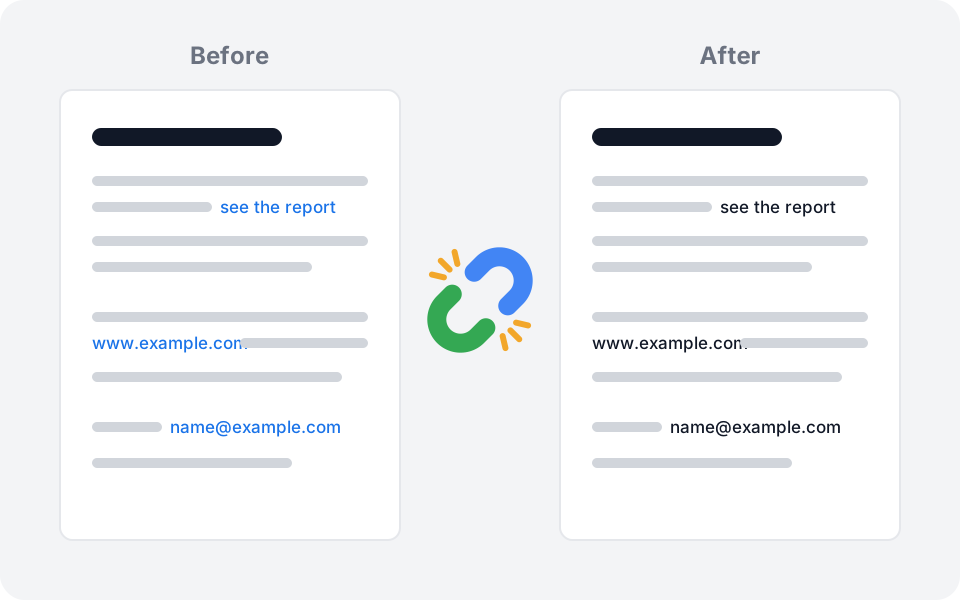
Some documents must go out without a single clickable link: grant applications, court filings, submissions with a no-hyperlink rule. Unlinker removes every link from a PDF and turns the blue link text black, from the side panel of Google Drive. Your original file is never changed: Unlinker saves a clean copy next to it.
Install
Unlinker is coming soon to the Google Workspace Marketplace. Tell us you are interested and we will write to you the day it opens.
Once installed, Unlinker appears in the side panel on the right of Google Drive (the column of small icons). Click its icon to open it.
Remove links from a PDF
- In Google Drive, click a PDF once to select it. Do not open it: Unlinker works from the file list.
- Open Unlinker in the side panel. The file is listed with Needs access.
- Click Allow access. Google asks you to confirm: this lets Unlinker open that one file, nothing else in your Drive. The file now shows Ready.
- Click Remove links from 1 PDF.
- The result shows how many links were removed and how many pages were recolored. Click Open file to see the clean copy.
The copy is saved in the same folder as the original, with the same name and
(unlinked) at the end: Application.pdf gives Application (unlinked).pdf.
If Unlinker is not allowed to write in that folder, the copy goes to My
Drive and the result says so.
Options
Links are always removed: after Unlinker, clicking the text no longer opens anything. Three switches decide what happens to the look of the text.
| Switch | Default | What it does |
|---|---|---|
| Make link text black | On | Text that was a link, and its underline, turns black. Turned off, the text keeps its color but is no longer clickable |
| Also colored web and e-mail addresses | On | A colored address such as www.example.com or name@example.com is treated as a link even when it was never clickable, which is common in letterheads and footers. Other text of the same color on that page turns black too |
| Keep addresses unclickable in viewers | On | Some viewers, Google Drive and Chrome included, make any web or e-mail address in the text clickable on their own. The address keeps exactly its look, but viewers no longer read it as an address. Copied, its dots, slashes and @ become look-alike characters |
| Also make all colored text black | Off | Every colored text in the document turns black, headings included. Images and drawings are not changed |
Not sure which to use? Keep the defaults. If link-colored text is still there in the result, run Unlinker again on the original with Also make all colored text black turned on.
Several files at once
Select up to 10 PDFs in Drive (Shift-click or Ctrl/Cmd-click), then open Unlinker. Allow access to each file: the button shows how many are left. Then Remove links from N PDFs cleans them one after the other.
Google gives an add-on a short time to answer. With many or large files, Unlinker stops before that limit and tells you how many were not processed: select those and run it again. Files other than PDFs in your selection are ignored.
What changes in the PDF
Removed:
- Links to web pages and e-mail addresses.
- Links that jump to another page of the same document, or to another file.
- A link that opens automatically when the document is opened.
Changed, depending on the switches: the color of link text and of the thin line under it.
Not changed: the text itself, fonts, images, page layout, bookmarks, form fields and comments. A logo or a scanned page is an image, so text inside it keeps its color.
Two things to know before you submit a document:
- Some PDF viewers make addresses clickable on their own. If the text of
your document contains
www.example.com, a viewer may turn it into a link when it displays the page, even though the PDF holds no link. Keep addresses unclickable in viewers prevents this: the address looks the same, but its dots, slashes and @ are read as look-alike characters. If you copy it from the PDF, paste it somewhere and retype those characters. - Always look at the result. Open the clean copy and check the pages that had links before you send it. When Unlinker meets one of the limits above in your file, the result shows them under ⚠️ Check before you send, with the pages concerned.
A PDF where Unlinker finds nothing to remove is not copied and does not count as a free file.
Free files and license
Each Google account can clean 3 files for free, with every option. A file counts only when Unlinker changed something in it; a refused file or a PDF without links is free. The bottom of the card shows how many are left.
After that, Unlock Unlinker opens a one-time payment of $29 for a lifetime license: unlimited files for your Google account, no subscription. Payment is handled by Polar, our merchant of record.
- After paying, come back to Drive and click Refresh. The card shows Lifetime license ✓. It can take a minute.
- Paid with another e-mail address? The license goes to the Google account with the e-mail used at checkout. If that is not the account you use Unlinker with, copy the license key from Polar’s receipt into License key and click Use license key. One key unlocks one Google account.
- Refund: write to support-unlinker@futzs.com within 14 days of the payment for a full refund.
Your files and privacy
- Unlinker can only open the files you allow, one by one, and the copies it creates. It cannot browse the rest of your Drive.
- To clean a PDF, the file is sent over an encrypted connection to the Unlinker server, processed in memory and returned at once. It is never written to disk, never stored and never logged, not even its name.
- Nobody at Futzs can read a document you clean.
The details are in the privacy policy.
For Google Workspace admins
Unlinker asks for these permissions:
| Permission | Why |
|---|---|
drive.file |
Open the files a user explicitly allows, create the clean copy |
drive.addons.metadata.readonly |
Name and type of the items selected in Drive, to list the PDFs |
script.external_request |
Reach unlinker.futzs.com and www.googleapis.com only |
openid, userinfo.email |
Identify the account, for its free files and license |
It never asks for full Drive access. Trial and license are per Google account.
Remove Unlinker
In Google Drive, open the side panel’s + (Get add-ons), find Unlinker under your installed apps and choose Uninstall. Or remove it from your Google account’s third-party access. The clean copies already in your Drive stay there; they are your files.
To erase what Unlinker stores about your account, e-mail support-unlinker@futzs.com.
Troubleshooting
The card says “Select one or more PDFs in Drive”
Nothing is selected, or the selection holds no PDF. Click a PDF once in the Drive file list. Google Docs, Word files and images are not PDFs: download or export them as PDF first.
“Needs access” does not go away
Click Allow access and accept Google’s dialog. With several files, the button handles them one at a time: click it again until every file shows Ready.
“Unlinker could not read this file”
The file was moved, deleted or its sharing changed after you selected it, or your organization blocks downloads of that file. Select it again and allow access once more. If you only have view access with downloads disabled, Unlinker cannot open it.
“No links found”
The PDF holds no link, so nothing was changed, no copy was made and no free file was used. If you still see blue addresses, turn on Also make all colored text black and run it again. If an address is still clickable in your viewer, see What changes in the PDF.
“This PDF is password protected”
Remove the password first (open the file with its password, then print or export to a new PDF), then run Unlinker on the new file.
“This PDF is larger than 25 MB” or “has more than 300 pages”
Split the document, clean each part, and merge the results.
Some colored text is still there
It may be part of an image (a logo, a scan), which Unlinker does not change. It may also be text that is not a link: turn on Also make all colored text black.
The copy is in My Drive, not next to the original
You cannot add files to the original’s folder (a folder shared with you as viewer, for example). Move the copy wherever you need it.
“Unlinker is unavailable, please try again”
Our server did not answer. Wait a minute and reopen Unlinker. If it lasts, check uptime.futzs.com or write to us.
I paid but the card still shows the paywall
Click Refresh. If you paid with another e-mail address, use the license key (see Free files and license). Still locked after a few minutes? Write to us with the e-mail used at checkout.
Still stuck?
Write to support-unlinker@futzs.com with what you were doing and the message you saw. Do not send the document unless we ask: we usually do not need it.