
Unlinker
Remove every link from a PDF, right from Google Drive.
Some documents must go out without a single clickable link: grant applications, court filings, submissions with a no-hyperlink rule. Unlinker removes the links from a PDF and turns the blue link text black, in two clicks, without leaving Drive.
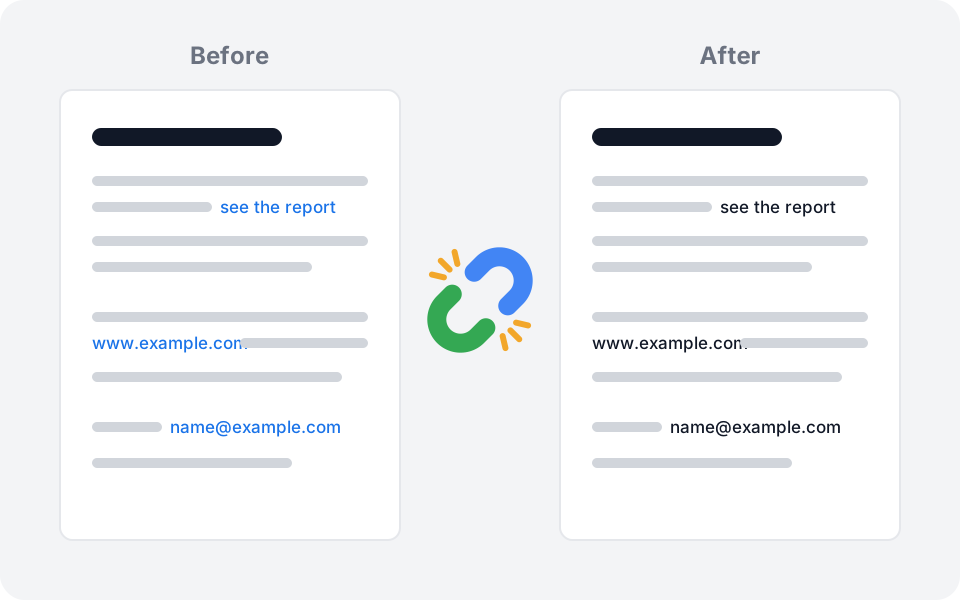
Every link gone
Web links, e-mail links and links that jump to another page of the document are all removed. Clicking the text no longer opens anything.
Link text turns black
Blue, underlined link text becomes plain black text with a black underline, so the page reads as if the link had never been there.
Bare addresses too
A colored www.example.com or name@example.com that was never a real link can be turned black as well. One switch, on by default.
Your original is never touched
Unlinker saves a copy next to the file, named "(unlinked)". If a PDF has no links, nothing is created and nothing is counted.
Files are never stored
The PDF is cleaned in memory and sent straight back to your Drive. Nothing is kept on our servers, and nothing about the file is logged, not even its name.
Pay once
Three files free to try it on your own documents. Then a one-time $29 for unlimited use: no subscription.
Three files free, then pay once
A file only counts when Unlinker changed something in it. Prices in USD; customers in the EU pay the same amount in EUR. Payments are handled by Polar, our merchant of record, which also takes care of VAT and sales tax.
Free
$0
Try it on your own documents.
- 3 files
- All options
- No card needed
Lifetime
$29 once
For anyone who cleans documents regularly.
- Unlimited files
- All options
- No subscription
Up and running in minutes
Select a PDF in Google Drive
One file or several, up to 10 at a time. Open Unlinker in the side panel.
Allow access to that file
Unlinker only ever sees the files you pick, one by one. It cannot browse the rest of your Drive.
Remove links
A clean copy appears next to the original, with the number of links removed and pages recolored.
Before you install
When will Unlinker be available?
Soon. It is being finished and will then go through Google's review for the Workspace Marketplace. Use Get early access and we will write to you when it opens.
Can Unlinker read my whole Drive?
No. It uses Google's per-file permission. It can open only the files you select and allow, and the copies it creates.
What happens to my file on your servers?
The PDF is processed in memory and returned at once. It is never written to disk, never stored and never logged. We do not record file names or contents.
Does it change my original PDF?
No. The original stays exactly as it is. Unlinker creates a new file next to it with "(unlinked)" in its name.
Will the text still look like a link?
Link text and its underline turn black by default. You can also keep the colors and only remove the links, or turn all colored text black.
Can a PDF viewer still make an address clickable?
Some viewers turn any text that looks like a web address into a link on their own. Unlinker removes the links stored in the PDF and the link styling; it cannot change how a viewer treats plain text.
Which PDFs are not supported?
Password-protected PDFs, files over 25 MB and documents over 300 pages. Unlinker tells you why and the file does not count.
Does it work in Google Docs, Sheets and Slides?
Not yet. Unlinker starts with PDFs in Drive; Docs, Sheets and Slides come next.
Is it a subscription?
No. Three files are free, then a single $29 payment unlocks unlimited use for your Google account.
Add Unlinker to your workspace
Unlinker is on its way to the Google Workspace Marketplace. Tell us what you need to clean up and we'll let you know the day it opens.