
How to add your Blackboard calendar to Google Calendar (Ultra and Original)
Blackboard holds your due dates and class events. Google Calendar holds the rest of your life. If you keep both open side by side, sooner or later a deadline lands in the gap.
Blackboard Learn can publish your course calendar as a link that Google Calendar understands. Getting that link takes a minute once you know where it is. What happens after you paste it depends on which of three methods you pick, and the default one is slower than most students expect.
The short version
- In Blackboard, open Calendar from the navigation bar on the left.
- Select Calendar Settings.
- On the Calendar Settings screen, open the dots menu (…) and select Share Calendar.
- Copy the link in the window that opens.
- On a computer, open Google Calendar. Next to Other calendars, click + and choose From URL. Paste the link and click Add calendar.
Your Blackboard events now show as a new calendar under Other calendars. Read on for what the link includes and what to do when something looks wrong.
Ultra or Original: where the link lives
Blackboard Learn comes in two looks, and your school may use one or a mix:
- Ultra is the newer interface, with a dark navigation bar on the left (Institution page, Profile, Activity Stream, Courses, Calendar and so on).
- Original course view is the older course layout, with a course menu down the left side of each course.
The confusing part is that most schools now run the Ultra navigation bar even when some or all courses still use the Original course view. In that setup there is one calendar for everything, and you reach it from Calendar on the navigation bar, not from inside a course. Anthology documents the same steps (Calendar Settings, dots menu, Share Calendar) for both the Ultra calendar and the calendar in Original course view.
Some older Blackboard sites still use the Original layout everywhere, including the landing page. On those, campus help pages describe a Get External Calendar Link button at the bottom of the Calendar page instead. If your screen matches neither, ask your school’s help desk.
What the Blackboard calendar link includes
The link points to a file in the iCalendar format (.ics), which almost every
calendar app can read. According to Anthology’s help pages, it carries:
- Assignment and test due dates, which appear automatically when an instructor sets a due date.
- Course events that instructors add, such as class meetings, course schedules and office hours.
- All your courses at once. You cannot share a single course’s calendar.
- A two-year window: course events from one year in the past to one year ahead.
What it leaves out:
- Non-graded items with due dates, such as tasks. Anthology notes that these do not appear in the course calendar automatically, so they will not be in the link either.
- Anything without a date. If an instructor posts an assignment with no due date, there is nothing to put on a calendar.
- Changes in the other direction. The link is one-way. Events you add or edit in Google Calendar never go back to Blackboard.
If you also use Canvas for some classes, the setup is similar but the link lives somewhere else. See our guide to adding the Canvas calendar to Google Calendar.
Three ways to get Blackboard into Google Calendar
Option 1: subscribe with “From URL”
This is the method in the short version, and the one Anthology describes. Google Calendar keeps the link and fetches the file again from time to time. It is free. It also has limits:
- Two delays stack up. Anthology’s instructor documentation says events “may take up to 24 hours to appear in your external calendar” (Anthology help). On top of that, Google re-reads subscribed links on its own schedule, which it does not publish. In practice, expect several hours to a day. We explain the Google side in why your Google Calendar subscription is not updating.
- Read-only events. You cannot edit, move or add notes to subscribed events.
- Computer only for setup. Google requires a computer web browser to subscribe to a calendar (Google’s help page). Once added, it shows on your phone too.
Option 2: import the file once
Under Settings → Import & export, Google Calendar can import an .ics
file. You would open the Blackboard link in your browser to download the file,
then import it.
The events become fully editable, but they are a snapshot. When an instructor moves an exam, your copy keeps the old date. That makes import a poor fit for a term’s worth of due dates, which tend to shift.
Option 3: sync the link into a calendar you own
The third option keeps the Blackboard link as the source and copies its events into one of your own Google calendars, checking for changes every few minutes. New items are added, moved dates move, and removed items disappear.
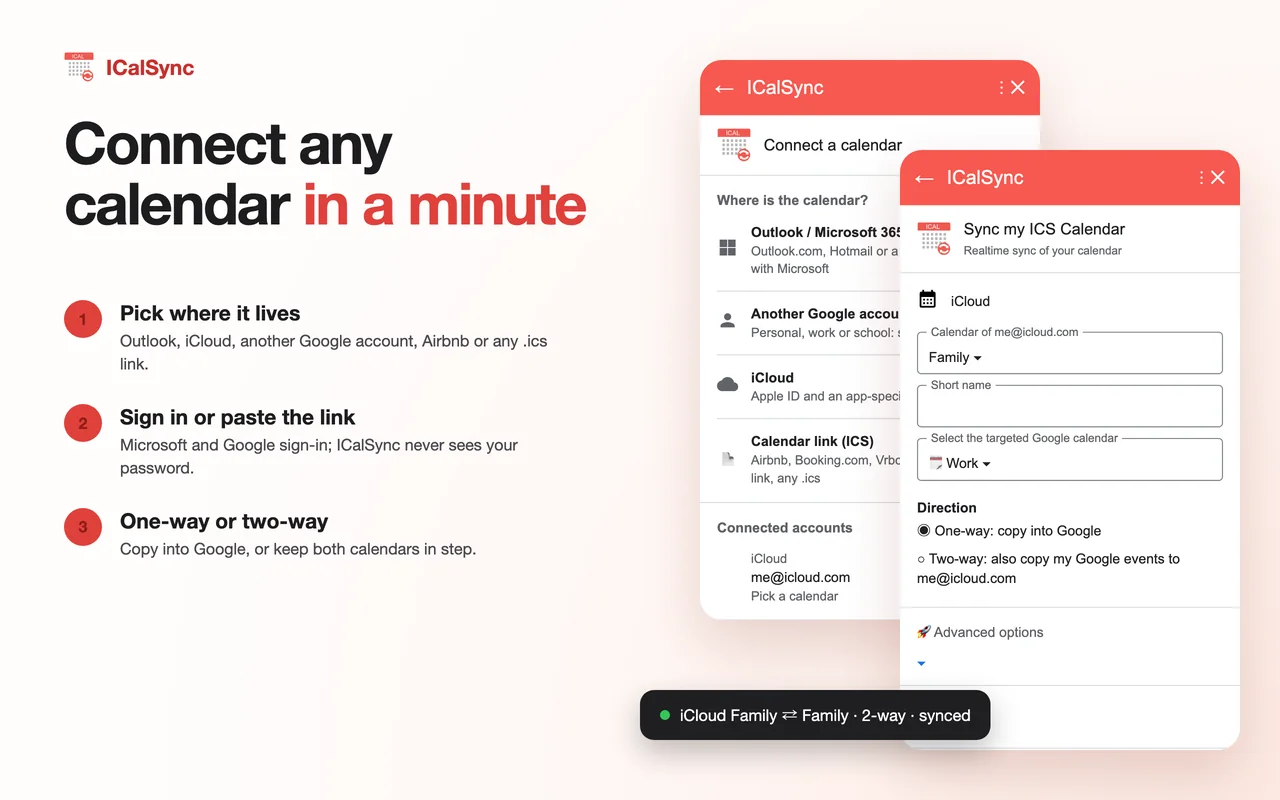
ICalSync does this from a side panel inside Google Calendar. It cannot make Blackboard publish changes faster than Blackboard does, but it removes the Google side of the wait.
Side by side
| Subscribe (From URL) | Import once | Sync (ICalSync) | |
|---|---|---|---|
| New and moved due dates | Hours to a day, on Google’s schedule | Never | Checked every 5 to 15 minutes, or right away with Sync now |
| Edit, recolor or add notes | No | Yes | Yes |
| Follows Blackboard after setup | Yes, slowly | No | Yes |
| Set up from a phone | No | No | No (Google Calendar add-ons run on a computer) |
| Cost | Free | Free | 14-day free trial, then a paid plan from $4/month |
Setting up the sync with ICalSync
- Install ICalSync from the Google Workspace Marketplace and open it from the right-hand side panel of Google Calendar on a computer.
- There is no Blackboard button. On the start card, under Something else,
choose Other calendar link (.ics). That option accepts any link that
ends in
.icsor starts withwebcal://. - Paste your Blackboard Share Calendar link and give it a short name, such as Blackboard.
- Pick the Google calendar the events should land in, then click Sync.
Creating a separate Google calendar named Blackboard first (Other calendars → + → Create new calendar) makes life easier. You can give it its own color, hide it during breaks, and set a default reminder that every due date picks up.
ICalSync checks the link every 5 minutes on the trial and the Pro plan, and every 15 minutes on Personal. Sync now runs a check immediately. The sync is one-way, from Blackboard to Google, the same as the link itself.
The 14-day trial starts when you connect your first calendar, not when you install, and needs no credit card. After that, Personal costs $4 a month or $39 a year for 5 calendars, and Pro costs $9 a month or $86 a year for 20 calendars. Without a plan, your calendars pause; nothing is deleted.
Fixing common problems
There is no Share Calendar option
Your school decides which Blackboard tools are switched on, and menus vary by version. Check that you are on the main Calendar page from the navigation bar, not a course’s own calendar, then look under Calendar Settings. If it is still missing, ask your school’s Blackboard support whether calendar sharing is available on your site. No outside tool can create the link for you.
The link stopped working
Anthology’s help pages do not describe a way to reset the link, so we cannot say for certain when an old link stops working. If Google Calendar or a sync tool reports that the link cannot be read, for example after your school moves Blackboard to a new address, go back to Share Calendar, copy the link again, and replace the old one wherever you used it.
Due times are off by an hour or more
Blackboard and Google Calendar each have their own time zone setting. If you study remotely or recently moved, check your Blackboard account settings, then Google Calendar under Settings → General → Time zone. An assignment due “at 11:59 PM” lands at the wrong hour when the two disagree.
Every due date shows up twice
You likely added the link twice: once with From URL and once in a sync tool, or a second subscription after the first seemed to fail. Remove the extra calendar under Other calendars and keep one.
A course or item is missing
Remember that tasks and undated items are not in the link, and that events older than a year fall outside it. If a real due date is missing, wait for Blackboard’s own delay first, then use Sync now in ICalSync or check again later with a subscription.
Keep the link to yourself
The link opens without a password. Anyone who has it can read your course calendar, including event titles and descriptions. Paste it only into tools you trust, and leave it out of group chats and forum posts when you ask for help.
Which option to choose
If you only glance at Google Calendar to see the shape of your week, a free From URL subscription is fine. If you plan your work around due dates, or your instructors move things during the term, the wait of up to a day will catch you sooner or later, and a sync that checks every few minutes earns its place. Whichever you pick, set it up once on a computer, and your phone will follow.
Questions
How do I add my Blackboard calendar to Google Calendar?
In Blackboard, open Calendar from the navigation bar, select Calendar Settings, open the dots menu and choose Share Calendar. Copy the link. On a computer, open Google Calendar, click the plus sign next to Other calendars, choose From URL, paste the link and click Add calendar.
Can I share only one Blackboard course with Google Calendar?
No. Blackboard shares one calendar for all your courses together. If you want to see one course at a time, you have to do it on the Google side, for example by hiding the whole calendar when you do not need it.
Why is my Blackboard calendar not updating in Google Calendar?
Two delays add up. Anthology says events can take up to 24 hours to reach an external calendar, and Google re-reads a subscribed link on its own schedule, which you cannot change. A sync tool such as ICalSync checks the link every few minutes and copies changes into a calendar you own.
Why don't I see a Share Calendar option in Blackboard?
Your school controls which Blackboard tools are turned on, and menus differ between versions. If the option is missing, ask your school's Blackboard help desk whether calendar sharing is available on your site.
Is the Blackboard calendar link private?
The link works without a password, so anyone who has it can read your course calendar. Anthology's own help says to share the URL only with trusted sources.
Blackboard due dates in Google Calendar, minutes after they change
14-day free trial from your first calendar. No credit card.